




AyushSay hi
Product Designer

I turn bold ideas into
digital
experiences
that

click.

I’m Ayush, I blend strong visuals, thoughtful interactions, and frontend craft to
make products feel clear, responsive, and effortless to use.

Say Hello
Illustrated portrait of Ayush

What I doMaking it simple

I’m Ayush, a graphic and UI/UX designer who brings visual identity and digital products together. Since 2023, I’ve created more than 10 web interfaces for international clients and maintained a 5.0/5 client rating. I’m also part of PHOENIX’s graphic team, the founder of PlacementDo, and a first-place winner of the UX Factor Competition at Avenir 2026. I combine thoughtful design with hands-on development to create distinctive digital experiences that work smoothly across platforms.

I'm Ayush, a graphic and UI/UX designer who brings visual identity and digital products together. Since 2023, I've created more than 10 web interfaces for international clients and maintained a 5.0/5 client rating. I'm also part of PHOENIX's graphic team, the founder of PlacementDo, and a first-place winner of the UX Factor Competition at Avenir 2026. I combine thoughtful design with hands-on development to create distinctive digital experiences that work smoothly across platforms.

FootballPaintingLofi old musicDiet cokeVideo gamesMomoBlack coffeeFan of Messi
UI/UX DesignInterface DesignResponsive DesignInteractive Micro-animationsSocial & Campaign DesignProduct DesignBrand identityInteraction Design

Logofolio

Branding

UX/UI

Enterprise Access ControlComplex Workflow DesignRBAC + Audit

ACCESS
WITHOUT
GUESSWORK.

A granular permission and audit engine for enterprise teams—built to give admins precise control without turning access management into a maze.

AYUSH PHIYAK   /   PRODUCT DESIGN CONCEPT
Access Control silver shield

01 / About the project

Permission
with precision.

Enterprise admins often need to give contractors and cross-functional teammates access to only part of a platform. A rigid “Admin vs. View Only” model forces an uncomfortable choice: grant too much access, or block work. This concept explores a granular role and audit engine that makes scope, duration, and policy conflicts visible before changes are saved.

Project type

Feature addition · Complex workflow

My role

Product design · UX strategy · UI concept

Product

Enterprise B2B SaaS platform

Scope

Role creation, temporary access, conflict resolution, audit history

02 / Problem framing

Two roles.
Too many risks.

Starting out with just 'Admin' and 'View Only' roles quickly breaks down in the real world. A contractor might need to update project files without seeing financial data, while a project lead needs to manage team members without touching system audit settings. The challenge is giving admins precise control without risking accidental overreach or locking themselves out.

01 / OVER-PERMISSION

Access is broader than the task

Giving Admin for a narrow task can expose unrelated resources or high-risk settings.

02 / WORK BLOCKED

View-only can be too restrictive

People cannot complete legitimate work when the only safe option removes every edit action.

03 / CHANGE BLINDNESS

Admins can’t explain what changed

Without a clear history, investigating access changes becomes slow and uncertain.

03 / Primary user · Proto-persona

The person
behind policy.

A fictional proto-persona to focus the product concept. The profile and details are assumptions for this portfolio exercise—not interview findings.

Priya Nair, fictional persona

Priya Nair

IT administrator

Priya manages access for employees, project teams, and external contractors across multiple workspaces. She is accountable for helping people move quickly without exposing data beyond their role.

Goals

  • Grant the minimum access needed for a task
  • Set an expiry without relying on a reminder
  • Understand inherited rules before saving
  • Answer “who changed this?” with evidence

Frustrations

  • Broad roles force risky workarounds
  • Conflicts are hard to spot in long settings pages
  • Temporary access can become permanent by accident

Need:

confident control with a clear recovery path

Jordan Lee, fictional persona

Jordan Lee

External contractor

Jordan is a secondary affected user. They need a small, time-limited set of permissions to deliver work, with clear boundaries and no access to unrelated company information.

Needs

  • Know which project resources are available
  • Complete assigned edits without requesting admin
  • See when access starts and expires
  • Get a clear explanation when an action is blocked

Risk if ignored

  • Confusing denials create support requests
  • Over-broad access increases data exposure

Need:

enough access to do the assigned work

04 / User flow & decision logic

Make the
safe path clear.

The admin starts from the task and scope, not from a blank grid. The flow previews the effective permissions, highlights policy conflicts, and gives the admin a way to resolve them before saving.

01 / DEFINE

Create a role

Name it, select its intended audience, and choose the modules it can reach.

02 / SCOPE

Set permissions

Choose No Access, Read, Edit, or Full Admin for each module.

03 / BOUND

Set conditions

Limit access by project, resource, start date, and automatic expiry.

04 / REVIEW

Resolve conflicts

Compare inherited policy with the new grant; choose the safest intended scope.

05 / SAVE

Confirm & log

Preview effective access, save changes, and record the actor and timestamp.

Decision A · Is access temporary?

Yes: require a start and end date, show who will lose access and when, and schedule expiry. No: require a reason for permanent high-risk grants and show the next review date.

Decision B · Does a rule conflict?

Yes: identify the source of each rule and default to the more restrictive inherited policy. Offer a narrow override only after the admin confirms scope. No: show the effective permission summary.

Default rule: Deny wins.

When policy sources disagree, preserve the more restrictive rule until an authorized admin explicitly reviews the exception. Never silently widen access. If the change would remove the last active administrator, block the save and provide a recovery route.

05 / Granular permission matrix

One grid.
Clear boundaries.

Each role has an explicit permission for each module. The admin can compare effective access across roles, spot sensitive areas, and adjust a single cell without losing the context of the wider policy.

No AccessReadEditFull Admin

06 / Conflict + audit engine

Catch it before
it becomes risk.

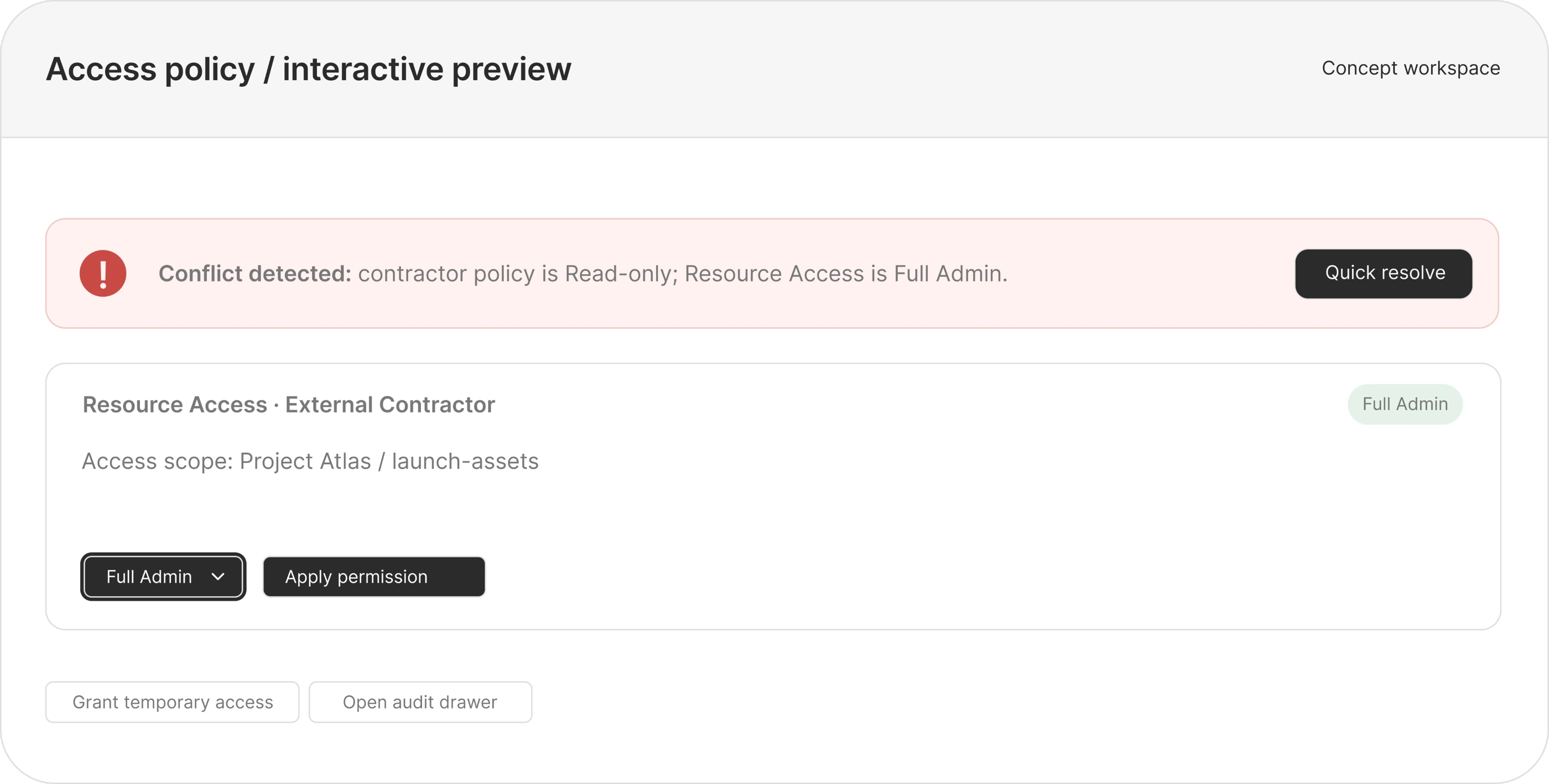
A permission conflict should explain what is colliding, where each rule comes from, what the effective access will be, and how to resolve it without forcing the admin to leave the workflow.

Conditional & temporary access

07 / Edge cases & UI states

Design for
the awkward bits.

Permission settings are high impact. The interface needs clear feedback for normal saves, partial failures, stale data, concurrent edits, and actions that could lock everyone out.

State 01 · API delay

Save is taking longer

Keep the draft visible, disable duplicate submission, show “Saving changes…” and allow safe retry if the request times out.

State 02 · Offline

Do not imply it saved

Mark edits as unsaved, keep a local draft, and explain that access changes will not apply until the connection returns.

State 03 · Multi-admin

Another admin changed the role

Compare the saved version with the local draft; show changed cells and let the admin reload or reapply selectively.

State 04 · Lockout risk

Last admin removal

Block changes that remove the final active administrator. Offer an approved transfer or recovery flow.

State 05 · Bulk edit

Review scope before applying

Show selected roles, modules, and affected people; provide an undo window and record the bulk action in the audit log.

State 06 · Expiry failure

Scheduled revocation fails

Escalate to the owner, retry revocation, keep the access visibly flagged, and log each automated attempt.

State 07 · Stale policy

Permissions changed elsewhere

Refresh the effective-access preview and ask for confirmation before applying a now-conflicting draft.

State 08 · Audit service

Change saved, log delayed

Separate permission-save status from audit-sync status. Never claim the record is complete while it is pending.

State 09 · Bulk partial

Some updates failed

List successful and failed items separately; retry only failed entries instead of repeating the whole batch.

Conflict alert

“External Contractor is limited to Read access, but this resource has a Full Admin override. Review the rule sources before saving.”


Shows the policy collision and the next action without assigning blame.

Success message

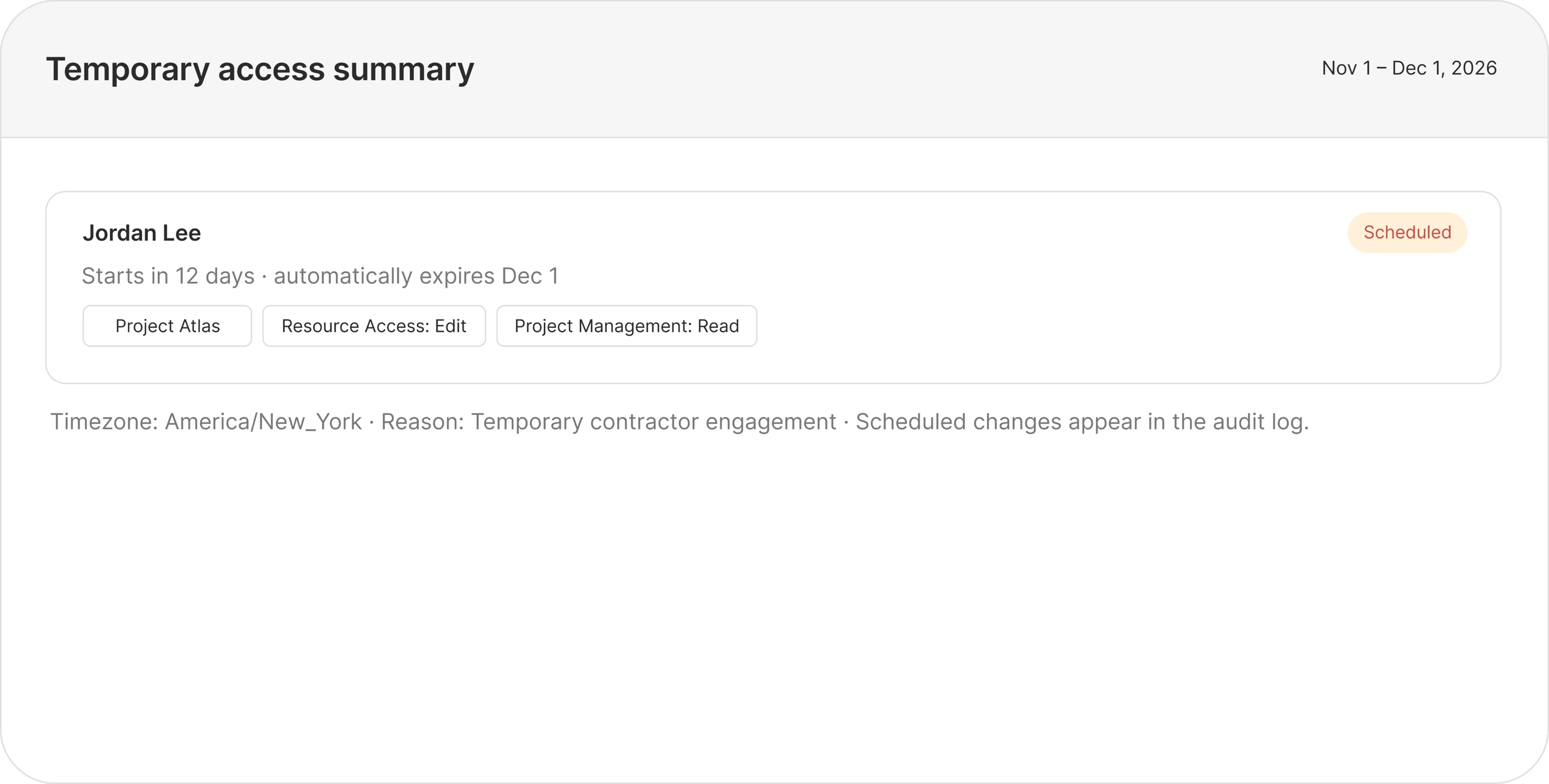
“Role updated. Jordan’s temporary access starts Nov 1 and expires Dec 1, 2026. View audit entry.”


Confirms what changed, who is affected, and when it ends.

Lockout warning

“This change would remove the last active workspace admin. Assign another admin before continuing.”


Explains the blocker and gives the user a recovery action.

Offline state

“You’re offline. Your edits are saved as a draft on this device, but access has not changed.”


Distinguishes a local draft from a committed permission change.

Temporary access tooltip

“Access is removed automatically at the end date. The change and expiry remain in the audit trail.”


Sets a clear expectation about revocation and history.

Full Admin tooltip

“Includes module settings and member management. Grant only when the person needs to administer this area.”


Makes the scope of the highest permission explicit.

08 / Portfolio story

Show the
design judgment.

A great portfolio story goes beyond the final matrix—it shows how broad, risky permissions transform into clear, reviewable access decisions. Keep your evidence honest by labeling fictional personas and sample policies until they’re validated.

Before rigid role model

  • Admin or View Only, with little control between them
  • Access duration is difficult to enforce consistently
  • Conflicts sit across policies and resource overrides
  • Change history is hard to scan during an investigation

After proposed RBAC engine

  • Four explicit permission levels across named modules
  • Time-bound grants with scheduled expiry and review
  • Inline conflict explanation with a safe resolution path
  • Chronological audit history with actor, time, scope, and change

Design system extensions

Components that make high-impact access changes consistent.

Permission selector

Four levels · descriptive labels · risk styling · keyboard support

Policy conflict alert

Severity · rule source · effective outcome · quick resolution

Expiry control

Start/end dates · timezone · automatic revoke · reminder state

Audit event row

Actor · timestamp · target · before/after · reason

Effective access preview

Inherited + direct grants · deny precedence · scoped exceptions

Admin safety guard

Last-admin protection · confirmation · recovery path

Save feedback

Saving · saved · partial failure · retry · unsaved draft

Bulk change summary

Impact count · changed modules · partial success · undo window

How to present the case study

01 · Context

Show the access gap

Explain why Admin / View Only creates risk or blocks work.

02 · User

Ground the problem

Introduce the admin persona and state what is assumption vs. evidence.

03 · System

Explain the rules

Show roles, inheritance, deny precedence, and time limits.

04 · Interaction

Walk through conflict

Use the contractor Full Admin clash as the key scenario.

05 · UI

Compare before / after

Feature the matrix, expiry modal, resolution alert, and audit drawer.

06 · Detail

Show failure states

Explain lockout prevention, stale edits, offline drafts, and partial saves.

07 · System

Show reusable components

Connect risk badges, selectors, alerts, and event rows to design tokens.

08 · Reflect

Close with validation

State what should be tested with admins and what remains unresolved.

Interface showcase · Concept screens

See the
system respond.

Concept screens showing permission conflicts, safe resolution, temporary access, and audit history. Static design previews; not connected to an identity or policy backend.

Access policy concept previewTemporary access summary concept

Validation plan

Trust the rules.
Test the edges.

Before a real release, I would validate whether admins understand effective access, can spot conflicts, and can recover from dangerous or partial updates. No usability testing or product impact is claimed in this concept.

TEST 01

Comprehension

Can admins explain effective access after inheritance and exceptions are applied?

TEST 02

Safe resolution

Can admins resolve a conflict without accidentally granting broader access?

TEST 03

Recovery

Can admins recover from offline, stale, partial, and lockout-risk states?

Enterprise RBAC · UX/UI concept

Precise access.
Clear accountability.

A complex workflow concept for safer permission changes, understandable exceptions, and an audit trail that answers who changed what—and when.

work by Ayush
© 2026 Ayush Phiyak · Independent UX/UI conceptFictional persona · Sample policies · No backend connection

Campaigns

Creative Poster

social media

Information Posters

A GOOD IDEA STARTS WITH A HELLO

Let’s make
something click.

A fresh identity, a bold campaign, or a digital experience. Tell me what you have in mind.

A CONVERSATION WITH

Ayush Phiyak

30-minute conversationConfirmed by email
01

Pick your moment.

Choose a preferred date and time.

Select a date above

02

A little about you.

Let’s put a name to the idea.

Choose a date to get started

Opens Gmail with your request addressed to me. Review and send it there; I’ll confirm the time by email. You can also use your email app or copy the details.